PR #5386 adds a pure Codename One text-editing path. EditField, RichTextArea, and CodeEditor can now keep their document, selection, and painting inside the lightweight UI while each port supplies keyboard and input-method events.
Text input must handle virtual keyboards, hardware keys, autocorrect, dictation, marked text from an input method editor, bidirectional text, selection, clipboard formats, and accessibility geometry.
Codename One traditionally delegates that work to a native platform field placed over the lightweight component during editing. The overlay remains the default for TextField and TextArea. It can create a small visual jump, and it cannot participate in lightweight painting for syntax highlights, rich runs, masks, inline images, or a custom selection model.
The port sends text operations instead of key codes
A soft keyboard does not type keys. It commits words, replaces a marked composition range, deletes text around the caret, and changes selection. Dictation may insert a sentence without producing one key event.
The new TextInputClient contract models those operations:
commitText(...)inserts final text.setComposingText(...)replaces the active marked-text range.finishComposing()accepts that range.deleteSurroundingText(...)implements virtual-keyboard deletion.onKeyCommand(...)carries navigation, selection, clipboard, undo, and redo.- Geometry queries locate the caret and selection for candidate windows and accessibility.
All offsets use UTF-16 indices. That matches Java String, Android Editable, and Apple string APIs. The document normalizes line endings before it updates selection, undo history, formatting runs, or the state returned to the platform.
The port still owns the keyboard session. Codename One owns the document and what appears on screen.
EditField is the opt-in plain field
Existing TextField and TextArea code does not change. Use EditField when painting and editing must stay inside the Codename One component:
EditField title = new EditField("", "Title", TextArea.ANY);
title.setSingleLineTextArea(true);
title.setColumns(80);

EditField notes = new EditField();
notes.setSingleLineTextArea(false);
notes.setRows(5);
notes.setColumns(30);

Form form = new Form("Issue", BoxLayout.y());
form.add(title);
form.add(notes);
form.show();
EditField extends the shared EditorView. Caret movement, selection, scrolling, undo, clipboard commands, and input composition use the same mechanics as the rich-text and code editors.
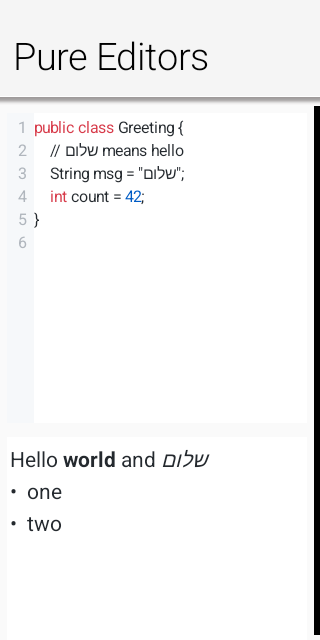
Text input is now a port-level capability that does not require a visible native field.
The clipboard carries several representations at once
The old clipboard API usually moved a String. That remains valid, but it cannot preserve formatting or describe an image or file.
ClipboardContent represents one clipboard item through several MIME types. Include plain text as the fallback, then add the richer forms you can produce:
ClipboardContent content = new ClipboardContent()
        .setData(ClipboardContent.MIME_TEXT, "Codename One")
        .setData(ClipboardContent.MIME_HTML, "<b>Codename One</b>")
        .setData(ClipboardContent.MIME_MARKDOWN, "**Codename One**");

Display.getInstance().copyToClipboard(content);
The same container supports RTF, AsciiDoc, PNG, JPEG, GIF, and local file references. Each port maps the representations its system clipboard exposes. Code that still calls copyToClipboard("text") or expects plain text continues to work.
RichTextArea publishes five text representations when you copy a formatted selection: plain text, HTML, RTF, Markdown, and AsciiDoc. On paste, it selects the richest format it understands and imports the formatting into its document model. If the clipboard contains PNG, JPEG, or GIF bytes, the editor inserts the image inline as a self-contained data URI.
This is format negotiation, not a private editor clipboard. Other applications can paste the native formats a port publishes, and application code can inspect the available types through Display.getInstance().getClipboardContent().
Bidirectional text uses one layout for paint and hit testing
Mixed Hebrew, Arabic, numbers, and Latin text can produce a logical order different from the order on screen. It is not enough to shape the glyphs correctly. A click must land on the matching logical offset. Left and right movement must follow visual runs. A selection can span rectangles in both directions.
The editor engine uses the same bidirectional runs for painting, hit testing, caret movement, and selection geometry. The component’s RTL flag sets the paragraph base direction.
That shared source of geometry also matters to native candidate windows. An East Asian IME needs to position its candidate list beside the composing range even though the visible field is not a native widget.
Rich and code editing stop being browser components
We introduced RichTextArea and CodeEditor in June with a bundled web-view backend. That got the API into applications quickly, but it kept the hardest state inside HTML and JavaScript.
The new implementation replaces the default web view with Java document and view objects:
EditorDocument
  normalized text and line offsets

EditorView
  caret, selection, composition, scrolling, clipboard, undo

CodeView
  incremental tokens, diagnostics, completion, gutter

RichView
  inline styles, blocks, links, image runs
The pure engine is now the default on every port. A port can still provide a native editor peer when it has a better specialized implementation. Application commands and asynchronous queries remain the same either way.
The JavaScript port benefits twice
The Java application runs in a Web Worker, while browser input events arrive on the main thread. The host creates an input surface for the keyboard and forwards semantic composition events across the worker boundary. The worker keeps the Java document, selection, and undo state.
That matches the architecture described in Friday’s release post: Java state stays in the worker, browser behavior stays in the port layer, and the bridge carries a defined message instead of sharing a DOM object.
The Codename One Playground now uses the same CodeEditor available to applications. It does not install another editor engine. Java and CSS diagnostics enter through setDiagnostics(...), while text input uses the same worker-to-host contract as other lightweight fields.
When to keep the native overlay
The native route is mature and appropriate for ordinary forms. It receives platform text behavior directly and costs less framework code.
Use EditField or the pure editors when you need one of these:
- The glyphs must not jump when editing begins.
- Text contains several styles or inline objects.
- Selection and painting must use application-specific rules.
- The same document model must run on every target.
- A mask or diagnostic must be drawn inside the text surface.
There are tradeoffs. Each port must implement composition, state updates, command mapping, and caret geometry correctly. A missed IME edge case belongs to our binding rather than to the native field. This release adds the architecture and broad tests, not a claim that every keyboard on every device has already been exercised.
Use the native overlay for ordinary fields. Use the pure editing path when the Codename One component must own the text layout and painting.
Tomorrow’s post covers a lightweight rich text component without a web view.
Discussion
Join the conversation via GitHub Discussions.